

Findings
Each problem pictured and traced to its cause, so your developer's time goes on fixing, not hunting.
- Who reads it
- Your developer, and you
- When it comes
- After every check, for anything new
- Which plans
- Every plan
Findings, Our store, as of October 16, 2026
- The problem
- F-1 The Product heading over the cart is too pale to read
- The rule
- 1.4.3 Contrast (Minimum) (Level AA)
- Where it is
- The cart page, at desktop, phone and 320 pixels wide.
- What caused it
- Not traced by the checks. The fix found it in the theme's cart stylesheet.
- The evidence
- Heading text #6d736d on #f6f3ec, 10 pixels, measures 4.38:1. WCAG 2.2 asks for at least 4.5:1 for text this size.
- For a shopper
- Customers with low vision may not be able to read what each column of their cart holds.
- Status
-
Fixed
Found October 9
Fixed October 10
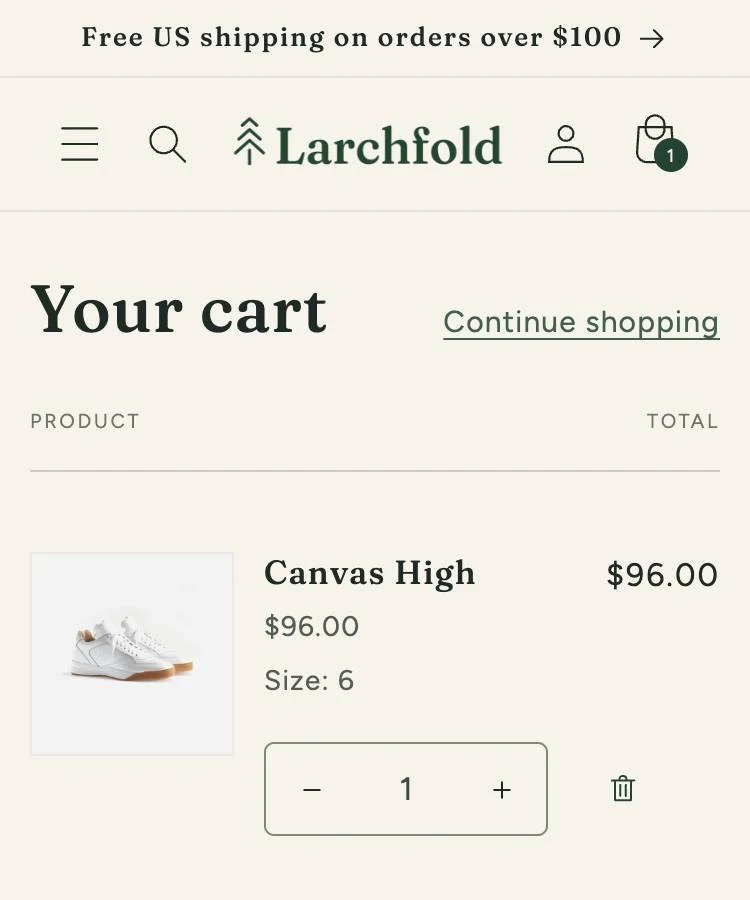
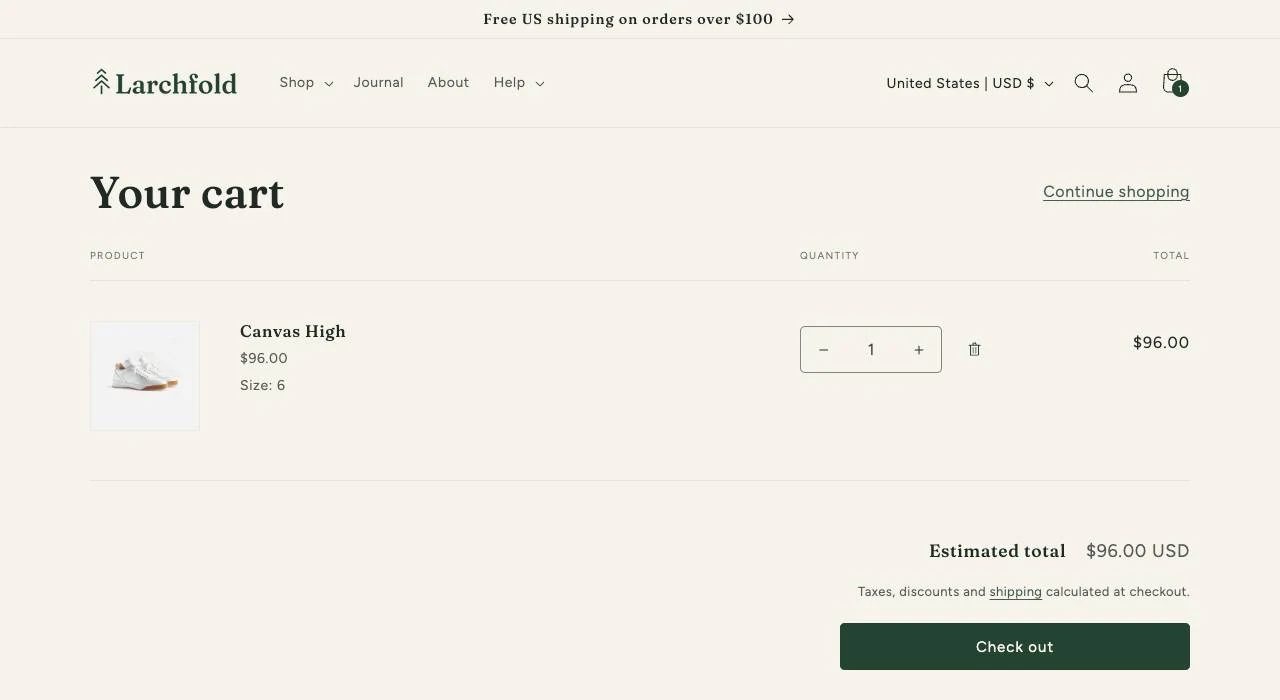
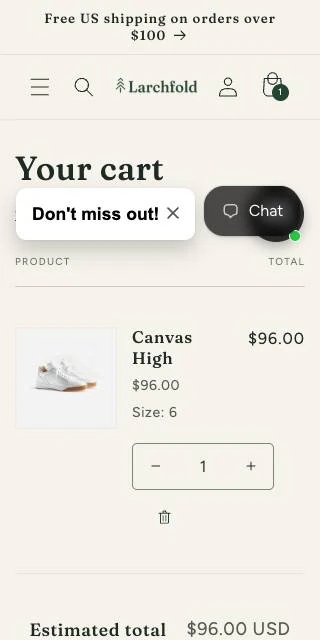
The cart page before the fix, on October 10, 2026, at each width where we saw the problem, each with a close-up.
The store's other problems
-
F-2,
The cart's other small headings are too pale to read: Quantity and Total, and the cart drawer's, 1.4.3 Contrast (Minimum). Not traced by the checks; the same fix. (5 findings)
Fixed
Found October 9
Fixed October 10 - F-3, Sold-out sizes are too pale to read, 1.4.3 Contrast (Minimum). Theme: Dawn's variant picker. Open Found October 8
- F-4, The quantity box has no label, 4.1.2 Name, Role, Value. Theme: Dawn's product form. Open Found October 8
- F-5, The sign-up pop-up's field labels are too pale to read, 1.4.3 Contrast (Minimum). App: Shopify Forms. (2 findings) Open Found September 24
- F-6, The pop-up's teaser is a button with another control inside it, 4.1.2 Name, Role, Value. App: Shopify Forms. (10 findings) Open Found September 24
- F-7, 147 product pictures have no description, 1.1.1 Non-text Content. Content: the store's product pictures. Open Found October 9
- F-8, The FAQ widget's button is partly covered, so it is too small to tap, 2.5.8 Target Size (Minimum). App: Chatty AI Chatbot & Live Chat. (11 findings) Open Found October 11
Open at our latest check, on October 16, 2026: 40 findings.
Here's one problem on our test store in full, then seven more of the 40 open on October 16, 2026, in short. Its cause shows as our record had it that day, and the fix later found it in the cart styles. Our test store's product pictures have no descriptions on purpose.
What's wrong, where, and why
Every problem comes with the same answers, so your developer knows where to start.
- The problem
-
What's wrong, in one everyday sentence.
- The rule
-
The rule it breaks, with a link so you can read it.
Its number, name and level in the Web Content Accessibility Guidelines (WCAG) 2.2.
- Where it is
-
Every page it affects, at each screen width where we saw it.
- What caused it
-
Your theme, your own content, the platform or another company's app. We name it when we can tell, and if we can't yet, we say so.
When it's the theme, the fix names the file.
- The evidence
-
A picture of the page as it was, and a close-up of the problem.
- What it means for your shoppers
-
Who's affected and how, without jargon.
- Status
-
Open, waiting for a person's review, fixed, or back again.
Why you can take each one at its word
We'd rather hold a problem back than report a wrong one.
-
A person reads every one
A person reads every problem before it reaches you.
How you can check it
Your record names who took each step: a person, or our software.
-
Unsure means set aside
When our checks can't decide, we don't report a problem. We set it aside for a person instead.
How you can check it
On your status page, it shows as waiting for review, not as a problem.
-
Every page, three widths
We check every page in full on a desktop, a phone and a very narrow screen. Each pop-up gets its own check, and so do your emails.
How you can check it
Look at any problem: it says which widths, and its pictures show them.
-
Shoppers' details blurred
We blur any shopper's name, email address or phone number before we keep a picture.
How you can check it
Blurring is the only change we make to a picture, and any outline we draw to show a problem goes on a copy of it.
For your developer: Close-ups record the element's position and the time. Each picture is named by its fingerprint, so it can be matched years later.
Where it fits
Every check looks for what's new, and each new problem arrives with its pictures.
- We check your store , This comes from here
- We start near checkout
- We check every fix
- We confirm it works
- You keep the record
By plan
Each problem looks the same on every plan. Every page gets a full check within 30 days on Engage, 14 on Resolve and seven on Defend.
See it on your own store
On the call, we show you the problems we found on your store, with pictures. You hear your price before you sign anything. No surprises.